|
|
By applying our program Fomsoft Data Recovery, you can avoid a common problem
when, without knowing the true state of the problematic media, the user gives away his media
to a free courier for free diagnostics with a preliminary estimate
of the cost of data recovery from about 500 rubles.
As a result, the disk actually falls into hostages.
In fact, it may turn out that even with a trifling problem, data from the carrier merges
and the final price will depend not on the complexity of the recovery, but on the manager's assessment
of the customer's creditworthiness, because his case turned out to be very difficult! Moreover, no one cheated the customer, any amount
approximately FROM will be true.
If it seems too expensive for the customer, they kindly offer to find another repairman and return
the carrier, pre-processed so that there is nothing on it anymore, or by putting obviously faulty parts.
At the same time, the user is told that he has such a difficult case that only such people can solve his problem
unique specialists like them. The user turns to other specialists and makes sure that really
his case is very complicated. If the data is extremely necessary for him, he gratefully lays out the declared
amount and will even advertise his "benefactors " to everyone.
|
|
You can solve many problems with data loss with your own hands without leaving home!
The reason for more than 95% of all problems associated with the loss of access to user data are local
physical failures of the sector space or fragmentary violations of the logical structure and integrity
of auxiliary system files that provide quick access to user data to the file system.
Moreover, the actual data itself remains physically unaffected by the problem that has arisen and is freely considered from
the problematic medium. At the same time, the carrier itself does not require any expensive physical repair or replacement
individual blocks and parts with the use of specialized equipment.
Now there is no shortage of data recovery programs, but to use them, the user needs to have
specific knowledge of the mechanism of the physical organization of file systems.
And without this knowledge, it is difficult for a simple user to perceive information from existing
data recovery programs in excess. Since they are focused on specialists and operates with special terms and concepts
that are not familiar to ordinary users.
Therefore, even in fairly simple cases, users are forced to turn to the services of specialists.
But since professional data recovery services are quite expensive, many users have
to put up with the loss of the data they need.
Fomsoft Lab's technology makes its recovery services incredibly affordable.
The complexity of data recovery work consists of the complexity of three stages that can go cyclically, these are:
- Analysis of the state of the file structures available on the problematic medium and the integrity of its sector space.
- Analysis of the state of the problematic carrier and determination of what needs to be done.
- The actual execution of the planned works.
The first stage, although it takes some time, is performed automatically with minimal participation
of the performer. Its result is analytical files reflecting the true state of the sector space and
the presence of file structures of operating systems available on the problematic media. At the end of this stage, the program
offers to transfer the information received to the Fomsoft Laboratory to receive free recommendations,
or simply complete the work.
The second stage the user can perform independently or get free recommendations from specialists
Fomsoft Laboratories for their further actions to restore information.
It can be very difficult for a simple user to complete this stage, with its small complexity, without outside help.
The third stage is the most time-consuming, but it takes a lot of time to perform purely mechanical operations.
In most cases, the user can perform these works independently with their own hands.
The use of such technology can significantly reduce the final cost of the information recovery service for the user.
At the same time, the user pays for our data recovery service only if he is fully satisfied with the result
of restoring the data he needs.
By downloading the free version of our program Fomsoft Data Recovery, the user can:
- do all the work with your own hands
- request free consultation and continue data recovery on your own
- execute
diagnostics of the problematic media
and, having given the command to the program to send the analysis result to the Fomsoft Laboratory,
use free professional recommendations.
- In complex cases of data loss or in case of problems with the technical condition of problematic media, performing
our engineer can perform the corresponding data recovery work. To do this, we use a means
of accessing the desktop of a remote computer, the license for the use of which we purchased from the company
"Ammi LLC", Russian Federation, Moscow, website: www.ammyy.com .
Get a free consultation on the recovery of lost information.
Our engineer will help you clarify the problem you have and offer
the most optimal way out of the situation.
The range of problems we solve is very wide. It can be either simple prevention, antivirus maintenance, or
recovery of lost data.
We solve any problems that require the participation of a qualified specialist with experience and knowledge
that ordinary users cannot have.
You can also contact us in other ways:
| Work schedule | From 9 to 21 Central European Time (CET).
The rest of the time, use the mailing address:
fomin@datarecovery-online.eu
|
|---|

| Maintenance phone number
WhatsApp +420 603 905 917
|
|---|
Providing remote access for the work of a Fomsoft Laboratory engineer.
With your permission, our engineer can work remotely on your computer, to do this, click the dialog button:

If the browsers Google Chrome or FireFox are used on the computer, the system will prompt you to save
the program FomsoftRemoteRecovery.exe .
Fig. 94.
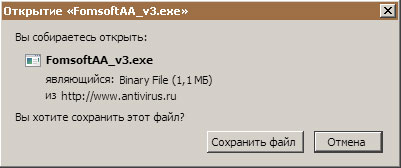
Fig. 94. Message of Google Chrome or FireFox browsers.
You can save the program anywhere. Next, you need to activate the "Show the progress of current downloads (Ctrl+J)"
button in the browser and click on the program name FomsoftRemoteRecovery.exe , Fig. 95.
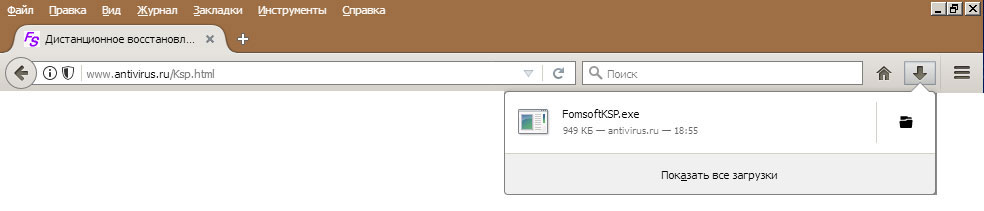 Fig. 95. Launching the FomsoftKSP program.
If other browsers are installed on the computer, then you can start the remote access startup program by selecting
the dialog button "Run ", fig. 96.
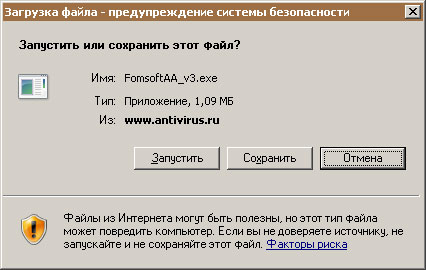 Fig. 96. Starting the program FomsoftRemoteRecovery.exe from the Internet.
As a result, the program FomsoftKSP will be launched, which will call the remote access module to
your computer's desktop and our engineer will be able to work on it remotely. Its start menu of this program is shown in Fig. 1.
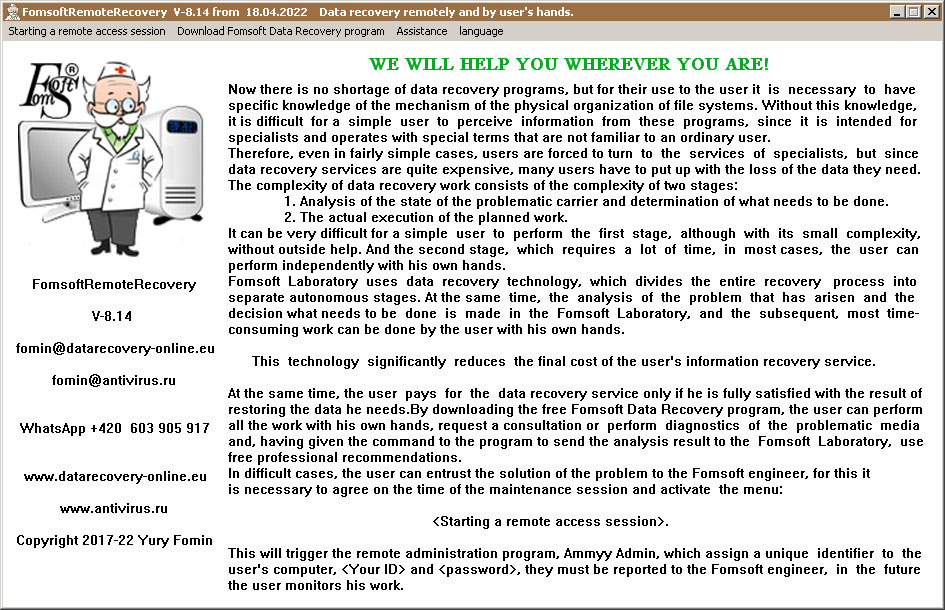
Fig. 1. The start window of the FomsoftRemoteRecovery program.
For remote maintenance, you need to activate the menu [Starting a remote access session].
At the same time, you will receive a request for confirmation of your consent to work with our engineer on
your computer, shown in Fig. 2.
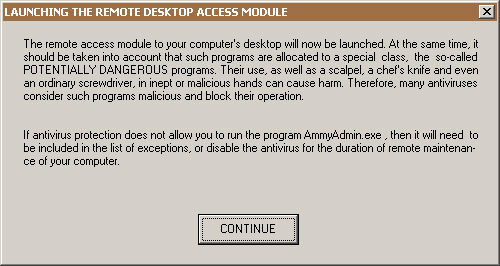
Fig. 2. Request to continue work.
After your consent, the remote administration program will be launched. This is an instance
of the program Ammyy Admin v3.10 of the company "Ammyy".
If the computer is running Windows Vista and higher operating systems, their security subsystem will issue
a request to confirm the eligibility to run this program.
However, despite the presence of a certified electronic signature, some antiviruses issue warning
messages that this program may pose a threat to user data.
Such a reaction of antiviruses to a remote access program cannot be considered either false triggering of antivirus
protection, or infection of the program with a virus. This is only a warning to the user about a potential threat
to his computer. The degree of danger of running this program is the same as the presence of a scalpel from a surgeon, or
a wrench from a plumber, to whom you turn for help. It all depends on who uses these tools and how.
Therefore, if you trust us, then you need to make the appropriate configuration of the antivirus, or disable it for a while
performing work on remote access.
After launching, the communication module will display the remote access session control panel, where
the computer ID is displayed [green field Your ID], Fig. 4.
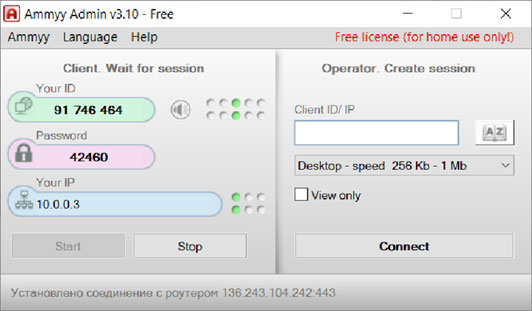
Fig. 4. Remote Access session Control panel.
This ID and password must be communicated to us, it is necessary for the safe interaction of our computers.
After we get in touch with us, a request to continue the communication session will appear on your display screen, Fig. 5:
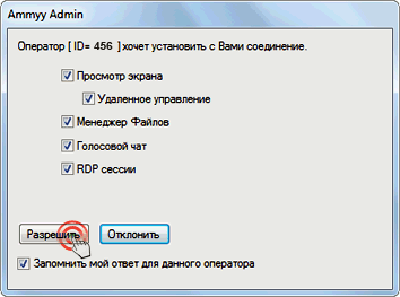
Fig. 5. Request to continue the communication session.
In the received request , check all the boxes, including the check mark "Remember my answer for this operator",
in the settings and click [Allow].
That's all you have to do, all the other work will be done by our engineer!
If the user's computer is equipped with a sound card and a microphone, then it will be possible to communicate with the Fomsoft engineer by voice.
|
|